
When you apply a threading model to a class, PostSharp adds two kinds of behaviors: behaviors that are necessary to implement the semantics of the threading model (for instance acquiring a lock or dispatching a method call) and behaviors that validate that the source code is valid against the chosen threading model (for instance that no field is written if the current method does not have write access). The second set of behaviors is called run-time verifications. By default, run-time verifications are enabled in the Debug build and disabled in the Release build.
This section explains how to enable or disable run-time verification.
Understanding the default configuration
By default, run-time verification is disabled if the Optimize Code compiler flag is enabled. Therefore, run-time verification is enabled by default in the Debug build and disabled in the Release build.
The project-level setting is the PostSharpRuntimeVerificationEnabled MSBuild property. You can set it to True or False in the project file instead of using the project properties.
Enabling or disabling run-time verification for a whole project
Perform the following steps to enable run-time verification by using the Project Settings dialog.
Enabling run-time verification in project properties
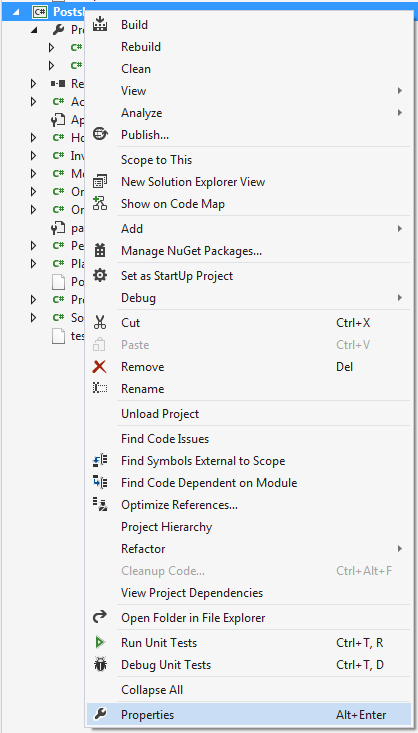
Open the project's Properties window.
Select the build configuration that you want to enable run-time verification on.
Note
By default, projects have two different build configurations:
DebugandRelease. Each build configuration can, and by default does, have a different behavior for run-time verification.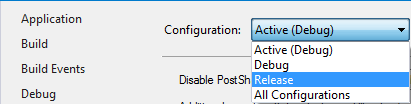
Open the PostSharp tab.
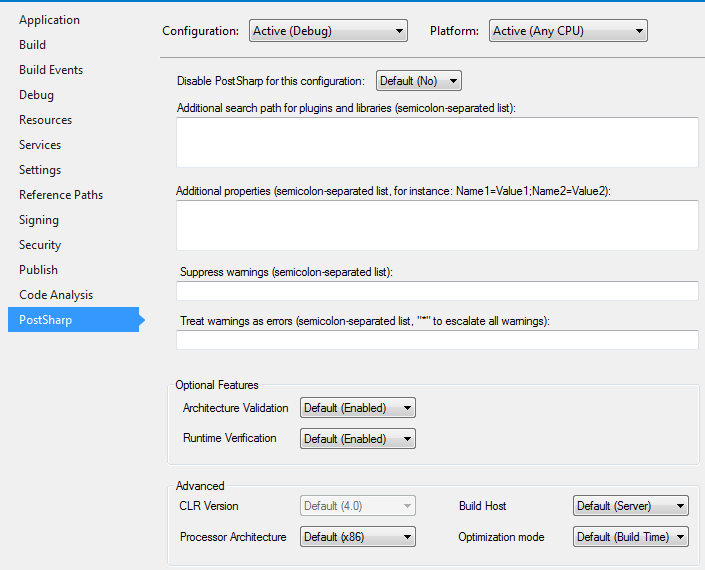
In the Optional Features section there is a Runtime Verification dropdown. The dropdown has three options:
Default,Disabled, andEnabled.The
Defaultoption will include either(Enabled)or(Disabled)after it. This value will change based on theOptimize Codecompiler flag setting. If the compiler flag is disabled, the dropdown option will readDefault (Enabled)and if theOptimize Codeflag is enabled the dropdown option will readDefault (Disabled).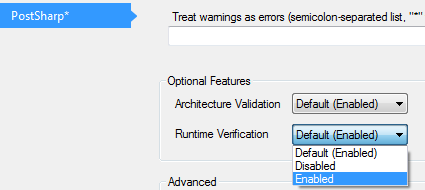
Enabling and disabling run-time verification for a specific class
You can override the project-level configuration of the run-time verification setting by setting the RuntimeVerificationEnabled property of the threading model custom attribute. This property is defined by the ThreadAwareAttribute class, from which all threading model attributes derive.
[ThreadAffine( RuntimeVerificationEnabled = true )]
If the property is not manually set, it derives its value from the setting on the project properties page. If you want to override the default value, you only need to set the value of the RuntimeVerificationEnabled to true or false.
See Also
Reference